
Download NTFS to FAT32 Converter – NTFS to FAT32, convert file system, file system conversion, data preservation, partition conversion, FAT32 format, NTFS format, data transfer, disk formatting, data safety, file system tool, Windows utility, data migration, safe conversion, large file transfer
Overview
NTFS to FAT32 Converter is a specialized utility designed to facilitate the transition between two widely used file systems: NTFS and FAT32. This tool addresses a common challenge faced by users who need to transfer data across devices that do not support NTFS, such as certain cameras, USB drives, or older media players. The primary purpose of the software is to convert a partition’s file system from NTFS to FAT32 without requiring reformatting or data loss, thereby preserving valuable files during the process. It is particularly useful for users managing large storage drives or those involved in data migration between systems with different compatibility requirements.
The application targets individuals and professionals who frequently handle cross-device file transfers, including photographers, content creators, and IT administrators. Its focus on data preservation makes it a reliable choice for those working with large files or extensive datasets. The developer, NTFS to FAT32 Converter, has positioned the tool as a lightweight yet powerful solution for a niche but critical task in digital data management. While no further background about the developer is available, the tool’s consistent functionality and clear purpose suggest a dedicated development effort. In the broader ecosystem of Windows utilities, this app fills a gap left by standard system tools, which often lack the ability to convert file systems without erasing data.
Key Features & Functionality
- Data Preservation Feature: The converter performs file system transitions without formatting, ensuring that all existing data remains intact. This is essential for users who cannot afford to lose files during migration.
- Handles Large Partitions: Unlike many similar tools, this software supports partitions exceeding 32 GB, making it suitable for modern high-capacity drives.
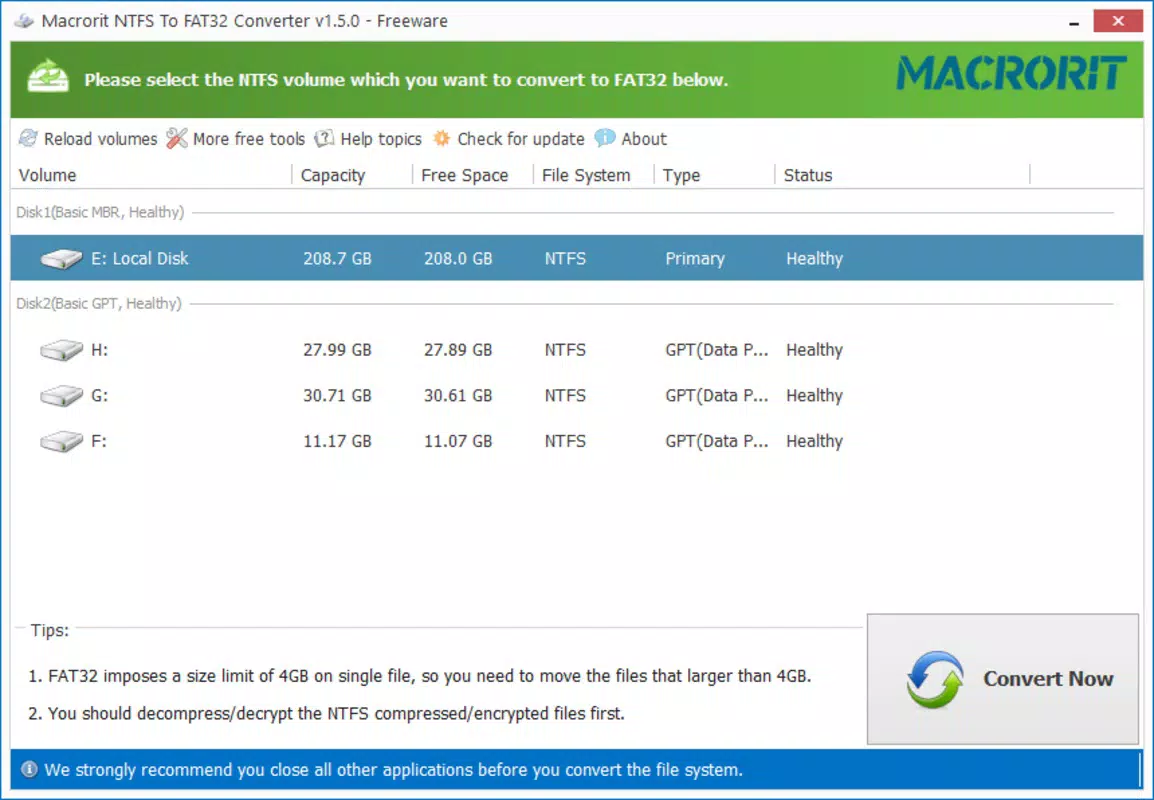
- User-Friendly Interface: Designed with simplicity in mind, the interface allows users of all technical levels to navigate the conversion process with minimal effort.
- Quick Conversion Process: The tool is optimized for speed, minimizing downtime and enabling efficient file system transitions.
- Clear Step-by-Step Guidance: Each stage of the conversion is clearly explained, helping users understand the process and reducing the risk of errors.
For example, a photographer transferring RAW image files from a large external hard drive to a camera that only accepts FAT32 can use this tool to convert the drive without losing any images. Similarly, a system administrator preparing a USB drive for deployment across multiple machines with varying OS compatibility can rely on the converter to ensure the drive is properly formatted without data loss.
Interface, UX & Performance
NTFS to FAT32 Converter features a clean, minimalistic interface that prioritizes clarity and ease of navigation. The layout is organized into logical sections, with clear labels and intuitive controls that guide users through each step. Visual cues and progress indicators help maintain awareness of the conversion status, enhancing the overall user experience. The tool’s responsiveness is consistent across different Windows environments, although specific performance benchmarks were not provided by the developer.
Although the developer did not list formal performance metrics, the software is described as fast and efficient, suggesting optimized resource usage. Stability during long-running conversions appears to be a focus, as the tool maintains integrity even with large partitions. Users can expect smooth operation on systems meeting standard Windows requirements, though detailed system compatibility was not disclosed. The interface remains stable and responsive throughout the process, minimizing the risk of crashes or unexpected behavior. Overall, the UX is designed to reduce cognitive load, making it accessible even to non-technical users.
Platform Compatibility & Technical Requirements
NTFS to FAT32 Converter is available exclusively for the Windows platform. The current version is 2.1, with a file size of 12.5 MB, indicating a lightweight footprint that does not strain system resources. The software is designed to operate on standard Windows operating systems, though specific minimum OS versions were not listed by the developer. This lack of detailed compatibility information means users should exercise caution when installing on older or non-standard Windows environments.
Given the tool’s focus on file system conversion, it is likely compatible with Windows 7 and later versions, but this has not been officially confirmed. The app does not require administrative privileges during normal operation, which enhances accessibility. However, the developer did not specify whether it supports Windows Server editions or other variants. For users seeking to use the tool on modern or legacy systems, verifying compatibility with their specific setup is recommended before installation.
Pros and Cons
Pros
- Preserves data during conversion without requiring formatting
- Supports partitions larger than 32 GB, a rare capability among similar tools
- Simple and intuitive interface suitable for non-technical users
- Fast and efficient conversion process with minimal user input
- Provides clear, step-by-step guidance throughout the procedure
Cons
- Platform limited to Windows; no support for macOS or Linux
- Specific system requirements were not disclosed
- No information on update frequency or long-term maintenance
- Not available as a mobile app or web-based tool
- Developer background and support channels are not publicly detailed
FAQ
Is NTFS to FAT32 Converter safe to use?
Yes, the tool is designed to convert file systems without erasing data, making it a safe option for users concerned about data integrity. However, it is always recommended to back up important files before performing any system-level changes.
Can I use this tool on large hard drives?
Yes, the software is capable of handling partitions larger than 32 GB, which makes it suitable for modern high-capacity storage devices.
Is the app free to download and use?
Yes, the application is available at no cost. There are no in-app purchases or subscription models reported.
Does it work on all versions of Windows?
The developer did not specify the minimum OS requirements. While it likely works on Windows 7 and later, compatibility with older or specialized versions has not been confirmed.
How long does the conversion process take?
Conversion time depends on the size of the partition and the speed of the storage device. The tool is optimized for efficiency, but exact durations are not provided.
Final Thoughts
NTFS to FAT32 Converter stands out as a focused, reliable utility for users who need to convert file systems without data loss. Its ability to handle large partitions and its user-friendly design make it a valuable tool for both casual users and professionals. While it is limited to Windows and lacks detailed technical documentation, its core functionality is robust and well-executed. For anyone managing cross-device data transfers or preparing storage media for compatibility, this app delivers a practical and secure solution. The free availability further enhances its appeal.
Download NTFS to FAT32 Converter now


